The point I was making was that the whole ‘mission statement and ethos’ of BFD3 (and BFD2) was to give the user the raw samples and the means to sculpt their own sound from those samples just like you would in an actual studio.
So to be asking BFD4 to give us preprocessed ‘professional sounding’ samples would be in opposition to that ethos that BFD has built it’s name and reputation on.
They would be abandoning one of the key features that had set it apart from it’s contemporaries.
We won’t ever move purely to a mix-ready approach. It’s not our thing. We strive to make desktop drums sound as close as possible to a real drumkit and a real drum recording session. That is our entire philosophy, boiled down into a trite marketing phrase. But it is the truth
They are amazing at that and thats one of my entire gripes. They add some dimension and the illusion of some width. They didn’t do a snare off recording of them! such a huge no no. to not have the option of snares on or off with every kit piece on every mic. rendering them useless except for of course… on a snare, and even on snare 2 out of 3 of them sound harsh. Its not 1970 anymore- its no good to have snare buzz in a mix unless its a live jazz recording or something. Its a huge amatuer move not having the option of snare on or snare off samples like DRUMASONIC has. BFD needs to take some ques and ideas from that software!! Its epic drum software
That is a shame because bfd has more detail in their recordings and samples… but i digress
If you wont make more polished mastered sounding stuff as an option then please take some ques from Drumasonic drum software. Its really good. They have full snare on/off separate sample sets for all channels. They have a really good decay and attack feature set with full control over both. Saves a lot of time from using different compressors and effects if in a time crunch which we usually are. It gets you to the sweet spot very fast. They have a global limiter (actually a global make up gain) on the master channel which is awesome.
Bleed? There are send knobs for bleed for each kit piece in BFD, turn them down if you don’t want them in the rest of the kit.
There’s a damping knob in tweaks. I wouldn’t mind if we had the ability to apply some virtual tapes and patches on the skins / cymbals. (This could be a modifier switch of the damping knob. Cutting frequencies and harmonics differently, depending on the placement of the sampled patch.)
You can insert many effects on any channel, including the master.
Give them a shot. If you didn’t find them, it’s because the GUI needs to be made more accessible. All have agreed to that.
Things I would like for the future.
Ability to have snares on/off as one single drum.
Ability to quickly load all same toms of the same set in one go.
Ability to quickly swap drum with another random drum of the same kind.
Complexity knob to keep the dynamics knob company. This is for play along purposes, or auto-BFD. Each groove should probably keep a tally of how many events it is comprised of. More events consistently on all x beats = higher complexity. ← well, ok, the algorithm sucks, you get the picture.
Not sure if this is already a feature, but with the problems I have been having setting up content and importing grooves it would be awesome if there was a feature to auto remove grooves that have been imported twice? After doing a batch import it looks like there are way too many grooves in my browser?
Like a ‘remove all doubles’ for grooves, kits and presets.
By the way, I don’t think it’s been mentioned before.
How about some predetermined (or even user-created) metadata that describe kit pieces sonically with those hollow words we all use from time to time. Like woof, click, wooly for kicks, or crack, bouncy, tight for snares, ping, wash, bright, dark, shimmer, boomy, snappy, boxy for toms etc etc. The words are obviously fail, but what I’m getting at is that some grooves sound exceptional on some kit combinations and abysmal on others. So, wouldn’t it be beneficial to be able to make substitution of kit pieces better aimed at some desirable sonic characterstic? I don’t disard that surprises are sometimes very pleasant, in that substituting kit pieces for wildly different ones might be what’s needed in some cases, but in most cases I just need to substitute a piece because of a certain trait of the sound.
(This probably is a “learn your kit pieces” issue, but hey, since we’re talking about making BFD 4 more accessible, I just put it there. Non drummers also use BFD, and if I see a flautist going on and on about how a bronze 13x6,5 is a whole different thing than a 7-ply 13x6,5 - and don’t get me started on solid walnut vs maple… I would be very troubled indeed with the state of this world. )
Scanning of content, can we have the option on start up to actually select whether BFD scans content or can be manually activated. After removing untold amounts of duplicated content auto loaded by BFD, every time I start it up it sits there and scans everything again and adds all the double and triplicate content that took me ages to remove.
Sort by:
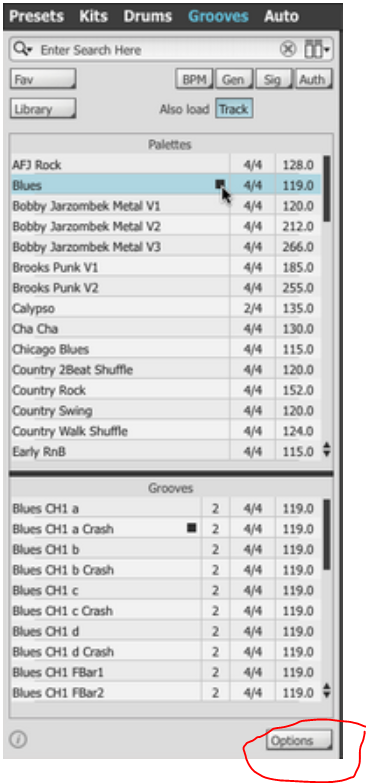
This sub-menu offers various sorting options for the Groove Browser display: items can be sorted by Name, Folder, BPM (tempo), Time Signature or Date Modified. The Folder setting is particularly useful if user Grooves are arranged within sub-folders in the user location or if factory or expansion pack Grooves have been manually rearranged into sub-folders in the factory location.
I’d like to see a better version of the groove importing that we have at present. Over the last week I have been playing around with the batch import BFD1 or midi files, it certainly has a mind of it’s own, sometimes it imports them correctly, for instance:
When looking at the interface after the import, if I click the Auth button to see the authors of the grooves, one time it listed every author I had installed grooves from, which was amazing, the genre/bpm/signature tabs also listed their respective subjects, then I uninstalled everything and started over, the tabs would then list in a completely different manner, not even meantioning anything like I mentioned before, even thoough I installed exactly the same way. It doesn’t make sense to me.
Other times I scan my groove content and nothing loads at all. It really feels like it’s what BFD feels like doing on the day LOL.
I have tried in may different ways, installing the content in different locations, followed the manuaul, followed online tutorials etc. Each one of them acts differently at different times.
This happens with many features, not just the ones I have mentioned.


 )
)