Offline usage: expansion packs should now work properly! And this time, we really mean it!
The BFD3 installer will check if License Manager is open and active, and will refuse to install.
License Manager online access checks should be more robust for users based in China.
LM 3-0-3-1 included.
Windows version now comes as a self-extracting .EXE file.
Visual Studio Runtime Redistributable runs automatically as part of BFDIS script if no previous installation detected.
Multi-threaded scan (faster / less hangy boot)
Fix for 5-sec scan loop that can sometimes occur.
IMPORTANT UPDATE INSTRUCTIONS
The login process has been updated to fix issues with inMusic account access and offline software usability.
To make sure this all works properly, BFD3.4.2.4 and BFD License Manager 3.0.3.1 are required.
This is included with the installer for BFD3.4.2.4, but you MUST close License Manager before installing. BFD34.2.4 will prevent you from installing if it detects that BFD License Manager is running.
EXISTING USERS
Here are the installation steps:
Launch BFD License Manager.
If you are not logged into your inMusic Profile, please login.
Once logged in, find BFD3 in your list of products. Click it to see the available downloads.
Find BFD3.4.2.4 and start downloading it. You can monitor the download progress on the Downloads tab in BFD License Manager.
Once downloaded click the magnifying glass to open the download location in Explorer or Finder.
Close BFD License Manager, and start the installer for BFD3.4.2.4.
When installing BFD3.4.2.4, please take care to select the correct VSTplugin location for your setup.
After the installation of BFD3.4.2.4, launch the BFD License Manager.
Hi Drew,
the installation worked smoothly on my PC and on my laptop (boith windows 10). Standalone and VST are working offline in Cubase 11 and Reaper 6.29.
Bingo, congratulations and a warm Thanx to You and the development team for making my favourite drum sampler work again under the In Music ownership.
Hey @Murt , can you send me some screenshots or maybe a short screen-capture of what you’re seeing?? If you don’t have anything to do screencaps with, you could try using LICEcap: Cockos Incorporated | LICEcap
I’m not sure I’m 100% following what the issue is, but could it be something as simple as there being tag errors in that packs xml, causing the browser to not show anything when the kitpiece ‘cymbal’ filter is activated? I’ll check that out tomorrow, but if so, that’s an easy fix for us.
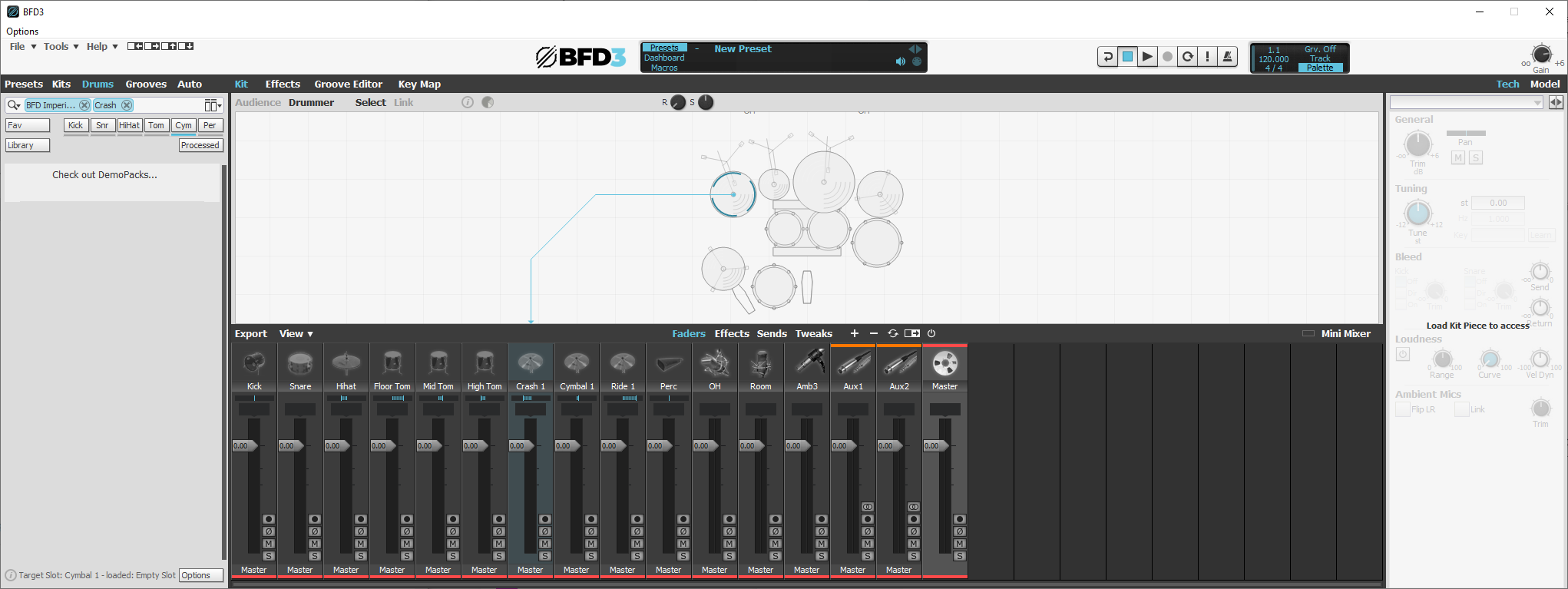
So you see in the browser at the top in the search bar, I’ve got the filter for the actual pack activated. This tells the browser to only show me drums for Imperial.
When I select the Crash 1 slot, I see that the browser has automatically - and usually helpfully - added a Crash filter to the search box too. This is to ensure that it only shows “crashes”.
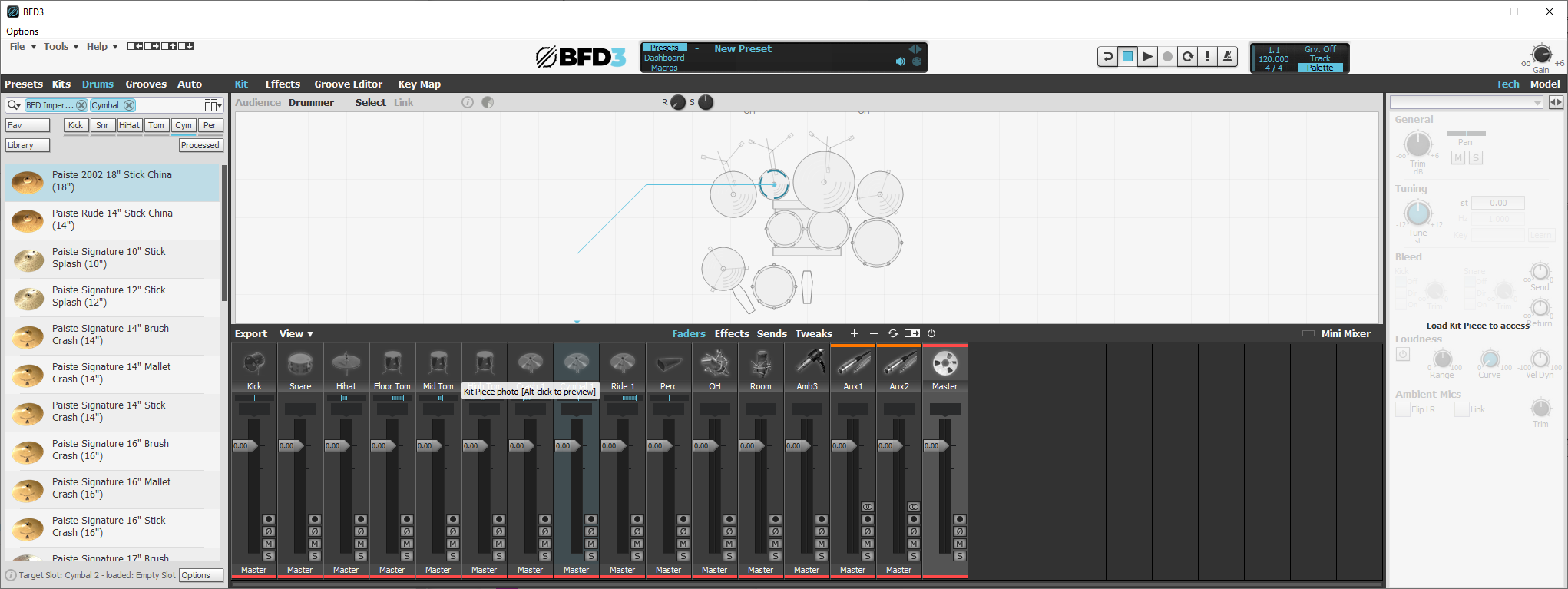
But with Imperial I see no drums. Probably because the crashes in Imperial do not have the correct kitpiece tags for the cymbal subclass. When I select the Cymbal slot, it works as expected.
Quick solution - delete the crash filter from the search box.
Slightly less quick solution - I need to go through all cymbals in the pack, update the xml, and then update the online installer for the pack, and then help you and others update their local copies without having to download all of the data again.
Send me a PM, let’s explore this together. Should be fairly straight forward to fix.
Sad tale to tell. I followed the instructions to a ‘T’ for downloading the new license manager and installing the update. That all went fine. Then the problems started. First I still can’t work offline. I tried opening the updated BFD 3 with being logged out of the License Manager. BFD put up an error message saying I had to login which means going online. That was bad enough.
Then I found out that my customized presets/kits and GM MIDI map (the original is not true GM MIDI) were all gone. Thankfully I had a clone to go back to. OSX 10.13.6 on a 2012 MacPro cheesegrater.
You have to be logged into License Manager. This requires going online to do so, but then you can go offline. This is expected behaviour.
If you were not already on 3.4.x.x, then your customized presets and kits will have been located in the relevant factory and user FXpansion folders. None of this stuff is deleted or messed with during install.
Copying them out of there into the BFD Drums equivalent ones and then rescanning the data-paths would have cured that. No need to revert back to a clone or back to 3.3.x.x.
Thanks Drew but not good. I try and keep my daw computer offline as much as possible. I shouldn’t have to go online each time I want to use a program. I don’t like persistent logins on sites and this is what’s happening with BFD 3.4.2.4. What happens when I reboot the computer? Do I have to login to the License Manager again? Sorry but until this gets fixed I’m reverting back to 3.3.1
Do I read this correctly? we have to be online to open the software but can then go offline?
How is this ‘fixing the offline issue’?
And more importantly - if this is expected behaviour, why are you advertising the software as needing an internet connection for downloads only?
This just gets worse
I disabled Ethernet, rebooted PC (Win 10) and BFD3 standalone loaded up fine and seems to operate as expected with no Internet access. So I don’t see the problem? The only question I would ask is under what circumstances would I need to have access to Internet for? Periodically? Only on update or installing an expansion?
Given that there has been so much speculation and opposition to this ,why has there been no unambiguous statement on the topic? Surely it wouldn’t take much for @exBFD_Drew to tell us.
Have Inmusic changed the terms of the licence without telling us?