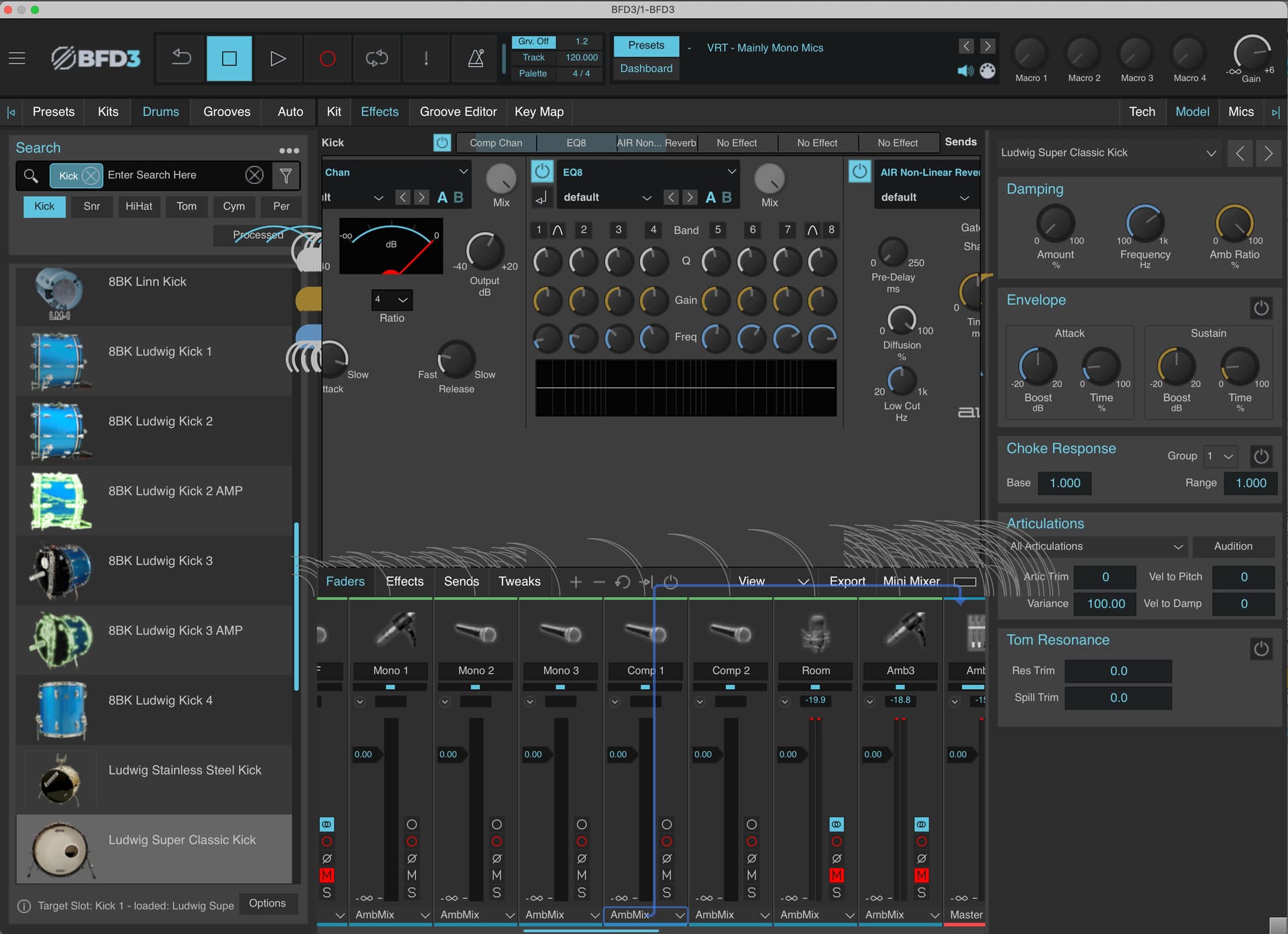
Hello All - New BFD user here! Wondering if anyone else has seen this GUI issue on macOS?
Random bits of the UI elements are being drawn and then just stay there while I scroll the various areas like the mixer and the effect sections. Eventually it goes away if I click around enough, but then it comes back right away when I scroll again. My system specs are: latest macOS M1 64GB RAM. The screenshot is a VST3 in Ableton Live, but it does the same thing in standalone.
I see it randomly, sometimes as obvious as you have shown, and some times less than that. I reported this before some tiem ago, but the updates from staff in here are almost non existent, I give up.
Okay, thanks everyone. I had opened a ticket about it and they did get back to me to ask more about how to reproduce it. So I provided as much information as I could. But it sounds like it’s probably a macOS/BFD compatibility issue. It’s ugly and sometimes inconvenient, but overall things are still usable.
still, it’s not acceptable. Iamgine buying an instrument and it’s scratched or dented but still plays ok, and they say to you, oh well, at least it’s usable. FAIL
Oh for sure, but I didn’t mean that was their reply to me. Level 2 support responded to me and were going to escalate the issue to the engineering team after I clarified some things and answered a few other questions. It was me saying that at least it’s not stopping me from using it. But yeah, not arguing with your point. I hope they fix it.
Side note:
While troubleshooting the installation of the expansions I purchased, I went digging around to try to find a way to delete all the duplicate presets, kit pieces (and other stuff) that I ended up with (I succeeded by deleting the db files, relaunching the plugin, and rescanning, in case anyone is wondering – no idea what this would do if you had built a bunch of custom kits, etc) and during this process I came upon the mysterious BFD “Resources” folder. Going down that rabbit hole was very interesting and I ended up finding all the individual images used in the UI, the style sheet files (for lack of a better term), and various “skin” files along with what look like JSON files, some XML files, and everything in between. But in a couple of the skin files, I saw these comments that were left by a dev at some point:
this one:
<!-- Note - These are all done as full fill colours in order to impart some level of z-ordering -->
and this one:
<!-- NOT DONE -->
So it looks like z-ordering resulting in elements of the UI unintentionally being on top of other things has been an issue for awhile and that they (at least at some point) intended to fix it.
There are a number of files that control the placement of the panels too. The coordinates appear to be fixed, so I can see how making the window resizable along with scrolling might break things in some cases.
It’s a bit of a mess. I’m sure the InMusic devs were super excited to take this over when they first saw the code base.
Open/Read the InstallScript in the BFD3.5 Core Library Installer with a Text Editor (Notepad..etc)
It’s a Hand-Off/Instruction set filled with the How and What everything does…and the Do’s and Don’t …lol
Example " You probably do not need to change these. If you do need to change them, make sure you understand the implications and what you are doing!"
The response from the dev side on this one is that it is a known issue. (I assumed that was the case.) Safe to say they have a plan to address it, but obviously aren’t going to provide details on when or how.