Just completed a new daw build, I am using Cubase 15 pro and when I open one of my saved project no BFD 3.5 drums pulled in and more importantly no drum track that I spent time arranging. Off course I had the cheek to install the BFD files on a new drive is this what caused Cubase to become confuzzed ?.
BFD insists now on checking registration every time I open it in Cubase much to my annoyance, it never did that before new build,
In the In music app thing I have activated BFD and my expansions but the BFD content has the download showing and not a green activated button, should it have one and why hasn’t it realised I have already downloaded the core files ?
Ok having done some testing if you turn on VST 2 in plugin manager and then close and reload the save the BFD Drums and drum track reappear. If you turn off VST 2 button it says you should save it to BFD 3.5. Changed it to 3.5 and the drums and drum track disappear. What’s the best mode to save the drums and drum track so i can reload and save as BFD 3.5 ?
Hammy
Still checking licences every time you open it off course !!!
BFD insists on checking registration every time it’s opened - even with multiple instances of BFD in the same DAW session. It’s not the fault of Cubase - it does the same thing in standalone or with any DAW. Many, many pages of complaints have been filed about this on this forum and others, but BFD owner inMusic is unable or more likely unwilling to change this.
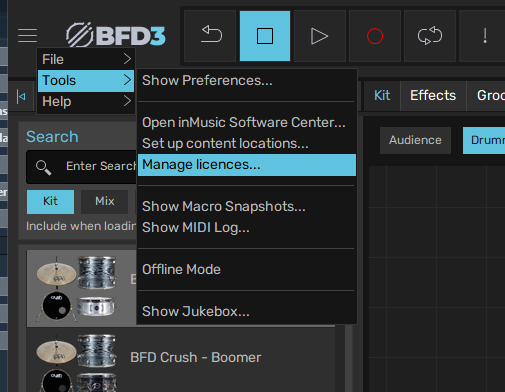
Re BFD content activation, you may need to confirm content location and authorize within the BFD3 software. The menu to access this is here at the 3-line (hamburger) menu:
Re the VST2 stuff, if you only have a track or two, I’d just copy/paste the midi from the old version and set up the drum track/effects again in the new VST3 BFD3.5. Sounds like Cubase is treating the VST3 version (BFD3.5) as a separate software from the older VST2 version.
You should set content locations within bfd3.5 so it can find the samples. Also, hopefully you are using BFD as a vst3 and not a vst2. Cubase does not like vst2 and everyone is pretty sure they will discontinue support for it soon.
For what it is worth, I use Cubase pro 15 also, and BFD3.5 is my primary drum program. It works fine, but as you noted, it does check for authorization every time you open the project. It’s annoying but I understand that they don’t want to deal with pirated software problems. So I’m OK with it.
Thanks for taking the time to reply, at the moment in cubase 15 you can still turn on the vst2 in plug-in manager, that way i can access the drums and drum track, then trannsferring it over to 3.5. I had this problem when I first updated to 3.5 with music I had made before the update. I found a way to save the palate and drumtrack, then I have to rebuild the mixer in cubase but I have saved all the fx presets so makes it a little bit easier. Before the rebuild it was not checking BFD everytime I opened a cpr, but it is now what happed to the 90 days registration check. It look like the spammers have invaded lol
I think you need to take a look at the alternatives ratskins. Almost without exception they implement a registration check on start up that is so fast it’s imperceptible! Certainly nowhere near as clunky and unreliable as the BFD system. So clearly it can be done, if your devs are serious about making it a professional piece of software.
As far as dealing with pirated software, cracked versions of BFD 3.5 are freely and widely available, and ironically run much more smoothly than the legit version as they eliminate the registration check!
I have a colleague who is an intellectual property law specialist who is looking into the legal aspects of buying the legit software, then running the cracked version to avoid the authorisation struggles. It’s a fascinating, if controversial, topic………!
I’m getting an unusual number of crashes (BFD side) ever since I updated to Cubase 15.0.20.
Moreover, I’m having the problem with BFD forgetting all settings within the project. (Kit, Routing etc etc)
Thank the powers that be that I could re-construct the kits by checking the track’s drum maps (generated by the now defunct feature of getting the drum-map directly from the instrument. Saved me AGAIN.)
Anyone knows what’s up? Is it Cubase? Is it BFD? @SF_Green ? Anyone?
I didn’t get 15 until fairly recently after the 15.0.20 update, and then I was away for 2 weeks. So I haven’t had a chance to use it much. I have only loaded BFD a couple times and of course it took forever to load the first time since it had to rescan and reverify all my licenses. And I did think it had crashed at first, but it had just opened behind the main Cubase window and was frozen until it finished scanning. Then it behaved normally.
Is there a crash dump for BFD? If not have you tried checking the Windows Event Viewer to see if it can shed some light on your crashes?
I’m on Win 10 22H2
Radeon 6650XT (in case the graphics driver is involved)
I have to say that cubase 15.20 crashes a lot not so far on BFD but when i sometime one of my uad fx, send the report it the hope it will be sorted, the just issued and emergency update 15.21, and claim they are wotkinng on others, here hopes so. Rule one keep backing up your work regularly saves losing something you have been working on.
I’ve had an increase in Cubase pro 15 crashes as well, but I have been able to trace them all back to certain VST2 plugins that I can’t seem to give up. FYI, those are Ohmforce plugins such as Ohmicide and Symptohm. All others seem to be OK at this point. Haven’t had any problems with BFD3.5 . . . at all. I’m going to call Cubase 15 pretty stable, and an improvement over previous version.
Cubase for me on my system hasn’t been stable since around 11 and un usable in 13. Mine is more likely to be system. But I’ve had very little help from Steinberg or plug in companies in general. Each blaming the other for problems.
Initially it looked like BFD was the problem. But not so over the years. It’s just as that showed up in Windows crash logs first. Then started going through my Amplesound plug ins and then just about everything.
I’m just about managing to run through projects with all the plug ins disabled. Enabling them one by one to render them all out.
Though each individual plug in shows no sign of crashing and Cubase is stable during the process. But I cannot run multiple plug ins in one project at the same time. And I have a reasonably powerful system.
All my problems are pointing to “incompatibilities” with the motherboard (AMD Ryzen 9)? Don’t quote me on that, as the jury is out.
Overall not good for me. The frustration is bad to say the least.
If I had the time, or the money I’d go back to tape? I wouldn’t really but there is too much tech in music stuff it’s killing the creative process, constantly trying to fix things.
And it’s all in the name of profit for the corporates.
Yeah I had to uninstall those a while back - they instantly crashed everything when I tried loading them. And that was long before 15 for me. Shame - they were cool.
That has been my experience as well. I really liked their wacky skins. If you are into that sort of thing check out the plugins from Freakshow industries seen here: https://freakshowindustries.com/
I feel your frustration. Mercifully, my machine is running like a top, and it’s a good feeling. It’s generally good to stick with major name brands, but I have a couple of big issues with companies that admit the bugs, but don’t fix them. I won’t name them, but you’d recognize them. Not BFD or Steinberg. But trying to figure out if it’s hardware or software is very annoying in your case.
The only maybe useful word of advice I have is to optimize windows by eliminating as many processes as possible that aren’t absolutely needed. I keep font optimization and that is about it. No screen animations etc. AI can help with this. Also, AI can help with BFD optimization. There are some settings for memory utilization, etc.
This may or may not apply, but I thought I’d mention it. I recently had a problem where Cubase would open up, but it would be absolutely frozen. You couldn’t even close it without doing it from the task manager. This would happened over and over many times in a row without change. I figured out that a Novation Launchkey was causing it by being connected with a usb cable at the time I opened Cubase. I disconnected the Launchkey and Cubase opened and operated perfectly. including after attaching the Launchkey again. Curiously, this Cubase lockup problem didn’t happen before or after this incident.
So you might try unplugging any usb items, open Cubase, and then try again. Can’t hurt and might help.