# VRT - No presets\_only individual drum pieces
**URL:** https://forum.bfddrums.com/t/vrt-no-presets-only-individual-drum-pieces/5824
**Category:** Bug Reports
**Created:** [February 22, 2024, 3:59am UTC](https://forum.bfddrums.com/t/vrt-no-presets-only-individual-drum-pieces/5824 "2024-02-22T03:59:36Z")
**Posts on this page:** 7
**Page:** 1
### Author:  [@Tolprog](https://forum.bfddrums.com/u/Tolprog)
#### Post date: [February 22, 2024, 3:59am UTC](https://forum.bfddrums.com/t/vrt-no-presets-only-individual-drum-pieces/5824/1 "2024-02-22T03:59:36Z")
Hi Guys,
I like a challenge but this time, I have to ask for help. I’ve read numerous posts about missing presets but I still can’t get the VRT presets to be visible in BFD Library. The individual Kit pieces (Kick, Snare, ect.) do show in the library but it would be nice if they at least had a VRT in front of the name but I digress.
Lastly, I’ve tried rescanning, reinstalling the expansion pack a few times.
I am asking for help because I think I have run out of ideas.
I am on a mac running OS 10.15.7 Catalina.
Here is the file path: Mac HD\>Users\>admin\>Documents\>BFD Drums\>BFD Vintage Recording Techniques.
**[All of my related BFD expansions, and grooves, ect. are contained in the BFD Drums folder and they all work with the exception of VRT]**
BFD Vintage Recording Techniques Folder contains folder named; audio\>VRT Ludwig\> [15 kit folders] and a version.xml doc.
Thanks,
Paul
---
### Author:  [@CHASER](https://forum.bfddrums.com/u/CHASER)
#### Post date: [February 22, 2024, 5:40am UTC](https://forum.bfddrums.com/t/vrt-no-presets-only-individual-drum-pieces/5824/2 "2024-02-22T05:40:09Z")
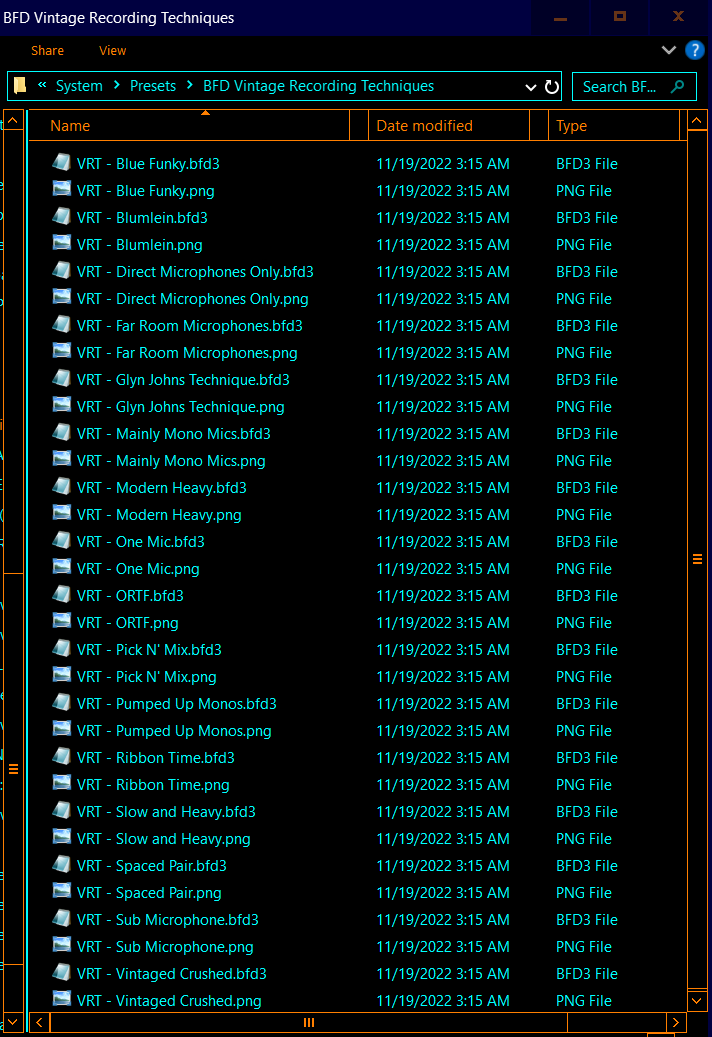
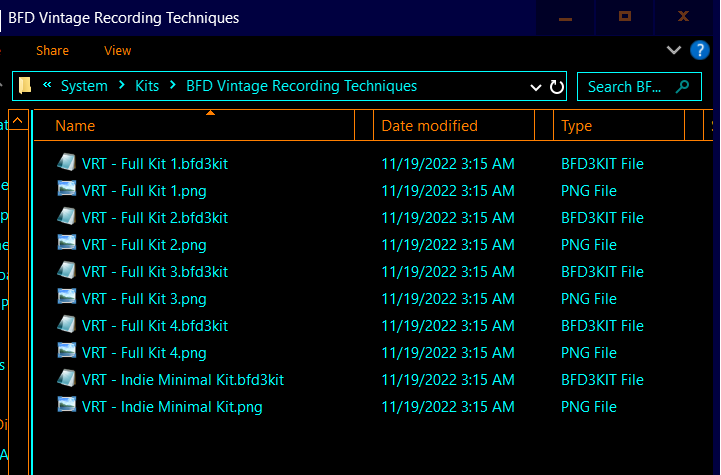
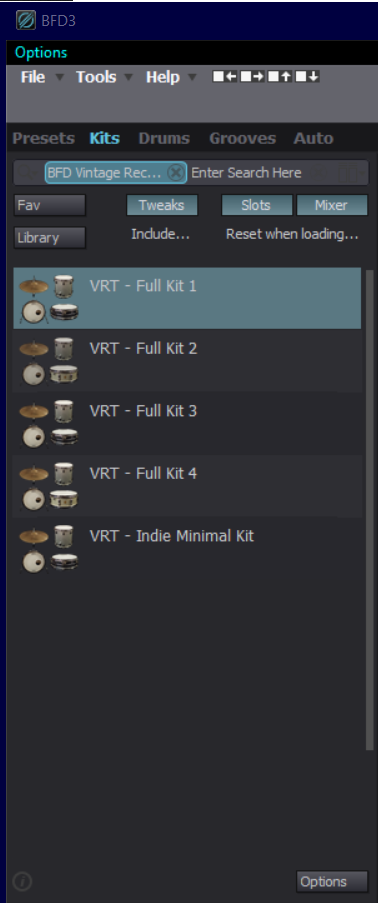
There should be (16) Presets…(5) Kits.
The path you posted…Mac HD\>Users\>admin\>Documents\>BFD Drums\>BFD Vintage Recording Techniques… is the User Path…
Are the Kits/Presets currently in that Folder?
The Kits and Presets should be in the System Folder…
I don’t normally use a Mac but the System Folder location should be
macOS - Library/Application Support/BFD Drums/BFD3/System
Move the Kits to the Kits Folder…Presets to the Presets Folder…Rescan System Content Folders.
If you copy over to the new location make sure you delete the old folders or you will end up with duplicates if/when you rescan User Content.
I organized and placed all Kits and Presets in Folders (if not already) not the “All in the Pool” where All are loose in one Folder…BFD Will still scan/Find them
---
### Author:  [@Steve63](https://forum.bfddrums.com/u/Steve63)
#### Post date: [February 22, 2024, 12:17pm UTC](https://forum.bfddrums.com/t/vrt-no-presets-only-individual-drum-pieces/5824/3 "2024-02-22T12:17:52Z")
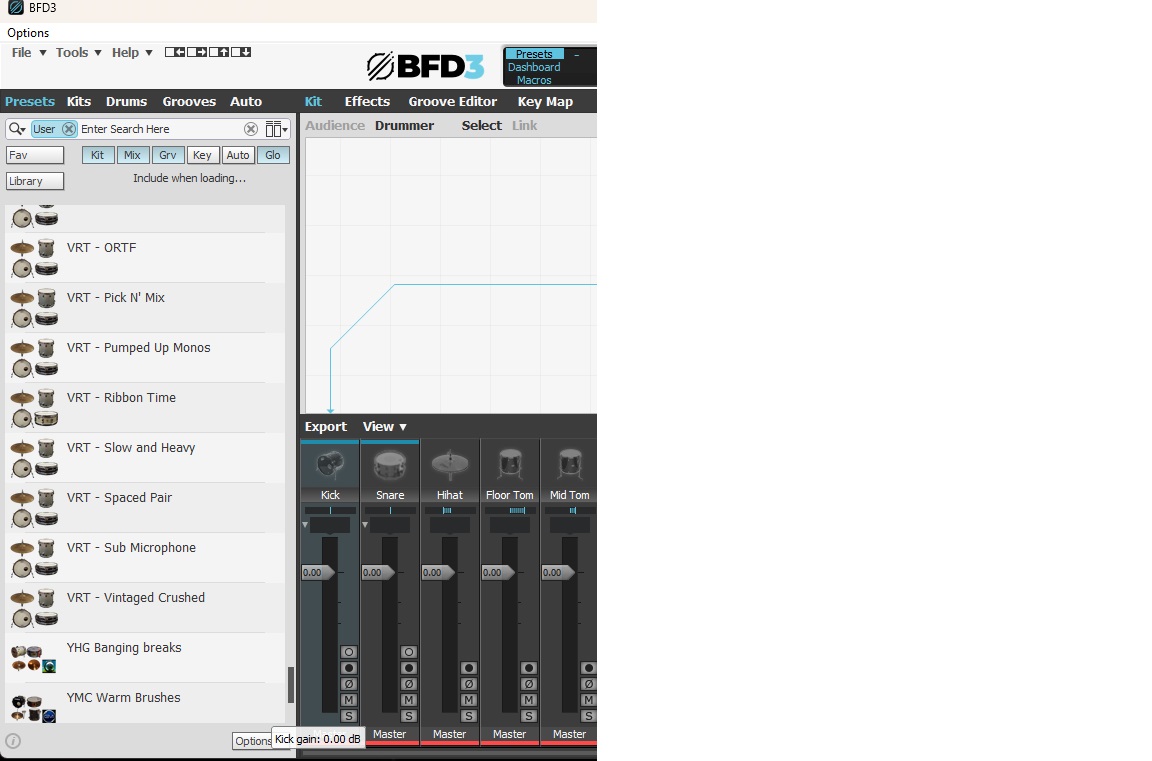
Mine are in C:\ProgramData\BFD Drums\BFD3\System\Presets but they still show up under ‘User’ in the library, I have lots of expansion presets that are in the same location but for some reason, BFD3 puts them in the user category.
Steve
---
### Author:  [@CHASER](https://forum.bfddrums.com/u/CHASER)
#### Post date: [February 22, 2024, 2:28pm UTC](https://forum.bfddrums.com/t/vrt-no-presets-only-individual-drum-pieces/5824/4 "2024-02-22T14:28:40Z")
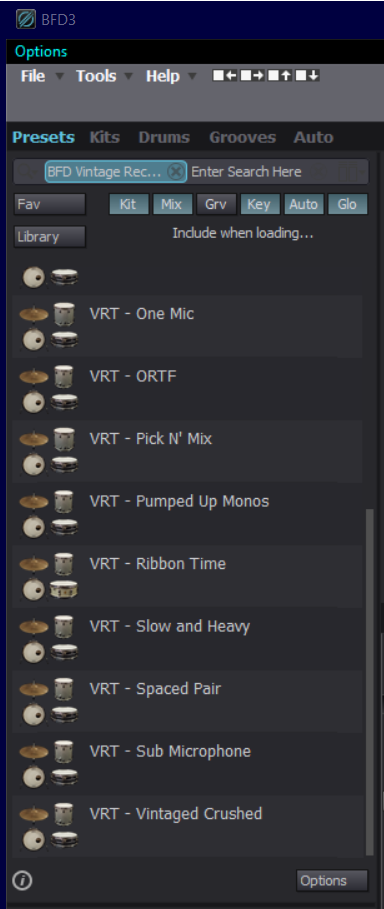
I have to remind myself that I corrected all of the expansions (or what I consider “Corrected”) and most will still have those issues even tho it may not be considered an “issue”…to me it’s annoying.

---
### Author:  [@Steve63](https://forum.bfddrums.com/u/Steve63)
#### Post date: [February 22, 2024, 3:25pm UTC](https://forum.bfddrums.com/t/vrt-no-presets-only-individual-drum-pieces/5824/5 "2024-02-22T15:25:50Z")
It is a bit annoying and I know it’s something @exBFD_Drew has said he wants to address in BFD4.
I have used an excellent tool made by a BFD2 user that, I think (?) lets you batch edit the xml files.
> **[Release Getting there... · burillo-se/bfd3me](https://github.com/burillo-se/bfd3me/releases/tag/v1.0-pre2)**
>
> New stuff:
>
> Fixed numerous crashes from previous release
> Replaced path textbox with combo box with a history of 10 successful path selections from the past
> Introduced OSX support
Trouble is, every time you need to rescan your content, it all reverts back to it’s previous chaotic state.
Steve
---
### Author:  [@Tolprog](https://forum.bfddrums.com/u/Tolprog)
#### Post date: [February 22, 2024, 9:43pm UTC](https://forum.bfddrums.com/t/vrt-no-presets-only-individual-drum-pieces/5824/6 "2024-02-22T21:43:56Z")
Hi Steve,
First, I want to thank you for your help regarding the folder structure. I had several problems to resolve.
1. BFD was seeing the kits/presets from my downloads folder. Funny, I always wondered where these kits/presets were and how BFD was reading them.
2. My folder structure was incomplete and messy on the ‘Library’ side. [‘User’ side was unchanged and just fine]
I would scan just a single folder to keep things simple. I kept seeing a resources folder in the scan but when I would go to the drive, there was never a physical **resources** or **system** folder present.
1. When I did reorganize the path on the drive; Library\> Application Support\>BFD Drums\>BFD3\>
suddenly in the finder, I could now see the physical **resources** and the **system** folder present.
Once, I scanned [Library path] BFD3 folder, all the kits/presets immediately populated the folders and I could see the libraries were organized in the BFD GUI and I was able to play the samples in ProTools.
In summary, I recall that something went wrong on my initial download (performed many months prior) and I ended up closing out and rebooting my computer and did a ‘continuation’ installation and I think that is where I messed up and perhaps I selected a different location on the continuation or PT 2 of the download. That’s my best guess.
I hope this makes sense and can help someone else but I admit the language is difficult to articulate in this medium.
Thanks again,
Paul
---
### Author:  [@Tolprog](https://forum.bfddrums.com/u/Tolprog)
#### Post date: [March 27, 2024, 7:50pm UTC](https://forum.bfddrums.com/t/vrt-no-presets-only-individual-drum-pieces/5824/7 "2024-03-27T19:50:35Z")
@CHASER I Just realized after all of this time that I forgot to thank you! I just wanted to let you know I appreciated the screen shots, ect.
P