# Core library not appearing
**URL:** https://forum.bfddrums.com/t/core-library-not-appearing/9442
**Category:** General Discussion
**Created:** [July 31, 2025, 11:26pm UTC](https://forum.bfddrums.com/t/core-library-not-appearing/9442 "2025-07-31T23:26:45Z")
**Posts on this page:** 9
**Page:** 1
### Author:  [@Vee](https://forum.bfddrums.com/u/Vee)
#### Post date: [July 31, 2025, 11:26pm UTC](https://forum.bfddrums.com/t/core-library-not-appearing/9442/1 "2025-07-31T23:26:45Z")
Hey I use BFD drums on my fl studio 21 and out of nowhere my bfd core library stopped showing up i’ve reinstalled the core library and BFD drums itself to all of my plugin folders and its not showing up im practically ripping my hair trying to figure this out does anyone know the issue
---
### Author:  [@deangersmith](https://forum.bfddrums.com/u/deangersmith)
#### Post date: [August 1, 2025, 2:52pm UTC](https://forum.bfddrums.com/t/core-library-not-appearing/9442/2 "2025-08-01T14:52:35Z")
Apologies up front if this is a obvious question, did you do a rescan from the InMusic License manager?
---
### Author:  [@Vee](https://forum.bfddrums.com/u/Vee)
#### Post date: [August 1, 2025, 5:08pm UTC](https://forum.bfddrums.com/t/core-library-not-appearing/9442/3 "2025-08-01T17:08:00Z")
Hey so i just checked in the product manager and in all the installed categories and it said no products found even though i have installed and uninstalled multiple times (also how do i rescan)
---
### Author:  [@CHASER](https://forum.bfddrums.com/u/CHASER)
#### Post date: [August 1, 2025, 5:24pm UTC](https://forum.bfddrums.com/t/core-library-not-appearing/9442/4 "2025-08-01T17:24:29Z")
Multiple Questions..
This is posted under BFD Player which uses the InMusic Software Center..
Are you using BFD Player?
BFDv3.4 and earlier versions use the BFD License Manager..
BFDv3.5 and above uses the InMusic Software Center..
Rescanning Content is a different procedure for each..
---
### Author:  [@Vee](https://forum.bfddrums.com/u/Vee)
#### Post date: [August 1, 2025, 5:35pm UTC](https://forum.bfddrums.com/t/core-library-not-appearing/9442/5 "2025-08-01T17:35:36Z")
I am using the latest free bfd player
---
### Author:  [@SF\_Green](https://forum.bfddrums.com/u/SF_Green)
#### Post date: [August 2, 2025, 1:17am UTC](https://forum.bfddrums.com/t/core-library-not-appearing/9442/6 "2025-08-02T01:17:28Z")
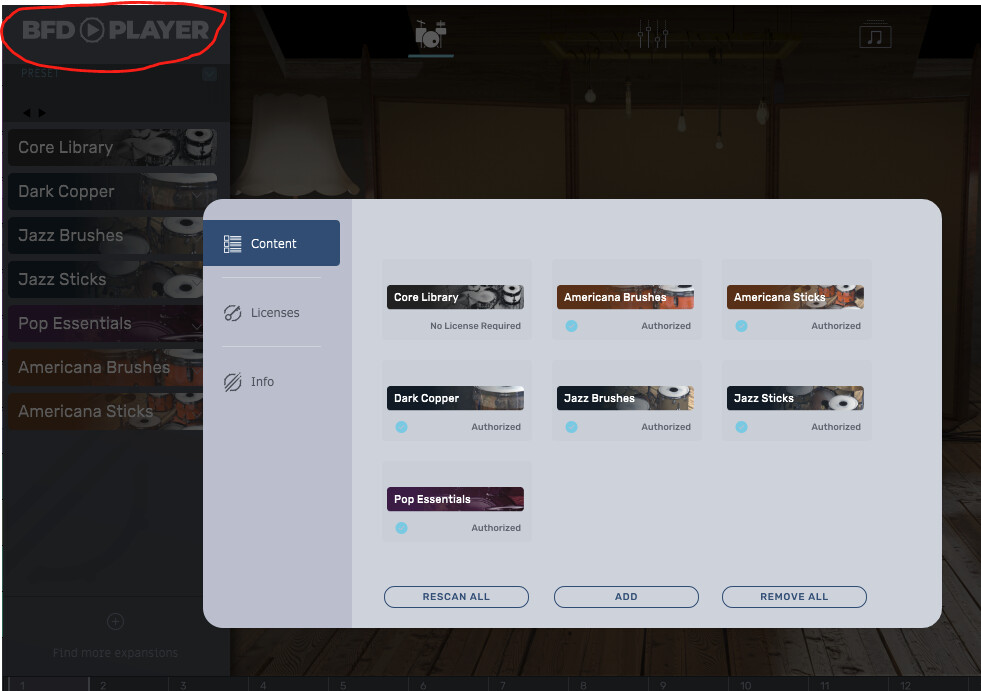
In BFD Player, click on the BFD Player header (circled in red) to bring up the license & content manager. Click the Content tab and then ‘Rescan All’. See if this finds your Core library. If not, search your drive for the folder “BFD Player - Core Library”. If you find it, then use the ‘Add’ button in the Content window to manually add it then rescan all.
If that doesn’t work then go back to the InMusic Software Center and install again, but choose your own location as to where to install, then rescan, and manually add if necessary.
If none of that works, then I’m out of ideas and you should contact support.
---
### Author:  [@Vee](https://forum.bfddrums.com/u/Vee)
#### Post date: [August 2, 2025, 11:41pm UTC](https://forum.bfddrums.com/t/core-library-not-appearing/9442/7 "2025-08-02T23:41:58Z")
hey the rescan button is greyed out and when i manually tried to choose the content path it said no new products were found
---
### Author:  [@CHASER](https://forum.bfddrums.com/u/CHASER)
#### Post date: [August 4, 2025, 9:34am UTC](https://forum.bfddrums.com/t/core-library-not-appearing/9442/8 "2025-08-04T09:34:58Z")
**EDIT:**
Multiple Posts were made during the **“Waiting for Approval Process”**
I made the mistake of responding on a Friday…apparently No One monitors the site on the weekends.
**\_\_\_\_\_\_\_\_\_\_\_\_\_\_\_\_\_\_\_\_\_\_\_\_\_\_\_\_\_\_\_\_\_\_\_\_\_\_\_\_\_\_\_\_\_\_\_\_\_\_\_\_\_\_\_\_\_\_\_\_\_\_\_\_\_\_\_\_\_\_\_\_\_\_\_**
Do you have an **[InMusic Profile](https://profile.inmusicbrands.com/customer/account/create/)**…and the InMusic Software Center Installed?..
Typically when I see BFD Player and Product manager mentioned together..that usually indicates that either you have an Alesis Kit that came with the FREE BFD Player (there were Special Editions that came with earlier version of BFD Player and used SN and Old License System)..or an older version of BFD using the BFD License Manager and downloaded installed BFD Player directly from BFD Drums without having the InMusic Profile and InMusic Software Center Installed.
The links to the InMusic Software Center are listed under the Product in your InMusic Profile..
The InMusic Profile email address must match whatever email address was used for BFD Player
download links and/or Expansions purchase.
The InMusic Software Center is launched and authorizes the BFD Player and CORE Library etc..
> **[BFD Player | Installation and Authorization](https://support.bfddrums.com/en/support/solutions/articles/69000833836-bfd-player-installation-and-authorization)**
>
> BFD Player is a free drum program for Mac and PC, and the simplest way to enjoy the power of BFD. In this article, we look at how to get started with this wonderfully detailed virtual drum instrument. TABLE OF CONTENTS Registration ...
---
### Author:  [@gblechle](https://forum.bfddrums.com/u/gblechle)
#### Post date: [September 24, 2025, 12:09am UTC](https://forum.bfddrums.com/t/core-library-not-appearing/9442/9 "2025-09-24T00:09:22Z")
I have the same problem. I downloaded the free BFD Player from the link I received in my email, and the core library was not installed. I discovered where to download it from, after logging into my InMusic account on the web and clicking around under my profile and “My Products”. There was a message that I should install the InMusic Software Center before downloading anything else. After installing Software Center, I opened it on my PC and under “My Software” BFD Player was displayed as downloaded and BFD Player Core Library was waiting to be downloaded. I’m currently downloading the core library…it’s large on a slow 10Mbps DSL link out in the sticks.