# 4K monitor problem
**URL:** https://forum.bfddrums.com/t/4k-monitor-problem/9657
**Category:** General Discussion
**Created:** [March 16, 2026, 1:24pm UTC](https://forum.bfddrums.com/t/4k-monitor-problem/9657 "2026-03-16T13:24:57Z")
**Posts on this page:** 4
**Page:** 1
### Author:  [@Viamichael](https://forum.bfddrums.com/u/Viamichael)
#### Post date: [March 16, 2026, 1:24pm UTC](https://forum.bfddrums.com/t/4k-monitor-problem/9657/1 "2026-03-16T13:24:57Z")
I cannot for the life of me use BFD with my 4K monitor. I have to keep an HD monitor as my second monitor just to read BFD. Anybody else experiencing this and are there any solutions to this issue?
---
### Author:  [@Pugs](https://forum.bfddrums.com/u/Pugs)
#### Post date: [March 20, 2026, 3:54pm UTC](https://forum.bfddrums.com/t/4k-monitor-problem/9657/2 "2026-03-20T15:54:29Z")
I know this doesn’t help but I use BFD 3 inside Cubase 15 and it works great with a 4K TV that’s about 5 years old.
---
### Author:  [@Viamichael](https://forum.bfddrums.com/u/Viamichael)
#### Post date: [March 20, 2026, 5:06pm UTC](https://forum.bfddrums.com/t/4k-monitor-problem/9657/3 "2026-03-20T17:06:20Z")
That’s interesting. I’m using Sonar. The majority of plugins look fine on a 4K monitor, but not BFD. Maybe somebody from BFD and tell me if it is possible for me to fix this. Thank you.
---
### Author:  [@mbernbrich](https://forum.bfddrums.com/u/mbernbrich)
#### Post date: [July 13, 2026, 7:24pm UTC](https://forum.bfddrums.com/t/4k-monitor-problem/9657/4 "2026-07-13T19:24:05Z")
I am using Cubase 13 an Windows 10
My monitor has a pixel size of 0.229 mm. The font used for the mixer instrument names is 8 pixels high (with anti-aliasing it is 9px).

Hence, the font is 1.8mm high.
The top middle section uses even 7 pixels:

This is too small to read. 😮💨
Different **scaling options** would be **highly appreciated**.
What I tend to do: PRESS WINDOWS+NUMPAD-PLUS to use the windows scaling option - not a solution, it is just a workaround.
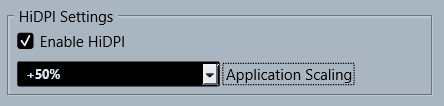
@Pugs: Do you use the Cubase HDPI setting and does it increase the size of BFD??